
Starting with 2/2/2020, we'll be adding in your weekly activity report, which you're getting in your e-mail every Sunday, a summary of the performance analysis data collected from your servers during the week.
This summary will provide you with a look into how your servers perform from week to week (hopefully, with a continuous trend of improvement! Although, there are always exceptions, so take that into consideration).
The performance summary looks more or less like the one below:
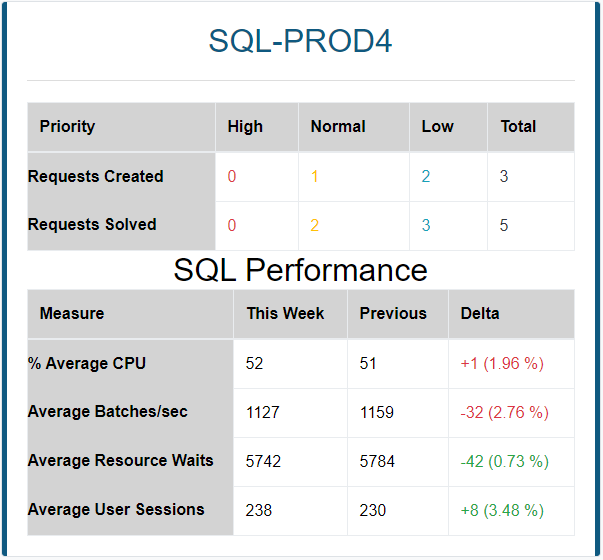
Each metric in the above table includes the calculated average for the last week, the calculated average of the previous week, the difference between them, including the percentage of change (with a color indication of green/red about whether this is a good or bad change).
PLEASE NOTE: A percentage of change smaller than ±10% is usually a normal deviation for a server's performance, and probably shouldn't be treated as any sort of significant change.
Please see below explanations about each of the metrics:
% Average CPU
This metric represents the average processor utilization in the server during the last week, compared to the previous week. If this value increases, it means a possible deterioration in server performance. Therefore, an increase in this value is usually bad, while a decrease in this value represents performance improvement and therefore a good thing.
An optimal percentage of CPU utilization is an average between 40-60 percent. This way, on the one hand, the server is not overloaded, and on the other hand, there's a good utilization of the server processor (as opposed to a low utilization which may hint that you're paying for costly hardware that you're not actually using).
Average Batches/sec
This value represents the number of SQL requests per second being run in your database server.
The higher this value is, the more it hints of good utilization of the server resources, and better performance because the database is successfully doing more per each second.
Therefore, an increase in this value is good, while a decrease in this value hints towards a deterioration of the server's "throughput" and therefore a bad thing.
Average Resource Waits
This is a calculated average representing the amount of time spent on waiting for resources (such as processor, disks, network, memory or locks) at any given time. In other words, this value represents how long sessions (users) are waiting for a resource to become available, instead of performing actual work on that resource.
An increase in this value is bad because it hints that processes are "wasting too much time" waiting for resources. This is usually an indication of ineffective queries, improper database design, or insufficient hardware (such as CPU cores, disk or network throughput, or RAM).
A decrease in this value represents an improvement in performance and therefore a good thing.
Average User Sessions
This value represents the average number of user sessions connected to your server at any given time.
A "user" may represent a human being or a software client of some kind, that connect to your database server.
In other words, you could look at this value as a representation of how "popular" your server is, or how many "consumers" it's serving simultaneously at any given time. Therefore, an increase in this value is good, because it shows that your server is serving more users.
However, it's important to remember that this value doesn't actually have much meaning on its own. It's recommended to look at this value in correlation with the other metrics, in order to understand how more/fewer users affect the performance of your server.
For example, there could be an increase in the number of user sessions, and simultaneously an increase in average resource waits (the previous metric above) - which indicates a worse performance of your server. But, more users = more workload, which makes sense overall.
On the other hand, the average user sessions could be decreasing, while the average resource waits are increasing - which indicates bad server performance, because there are fewer users but more workload? That's definitely suspicious!
Frequently Asked Questions
- Q: Why a certain metric doesn't show up in my report (such as average CPU %)?
- A: The metrics shown in the report can only be calculated if they're actually being collected from your server. In certain scenarios, a server may not be properly "accessible" to our monitoring service (which usually happens due to permissions-related issues), and as a result, not all metrics could be visible. It's definitely recommended to speak with your DBChief in order to solve such issues as soon as possible.
- Q: There's this one server for which no performance data is displayed. Why?
- A: The performance data is displayed based on the "SQL Server Instance" field specified for each support request. This field is automatically filled by automated alerts, but not all support requests are created by automated alerts, and sometimes this field might not be filled with the correct server name. Also, some support requests are opened with the monitoring service server filled in "SQL Server Instance" (for example, Heartbeat Failure alerts). Obviously, the monitoring server is not monitored itself because it's not a database server, so naturally, there won't be any performance data for it.
- Q: I don't understand the meaning of one or more metrics. What do all these numbers mean?
- A: We try not to confuse you with too many technical details, and that's why the data shown in the report is generalized. It's only meant to show the "trend" in performance between one week and another. If you wish to know more specific details and/or a technical explanation, feel free to contact your DBChief. In any case, we'll be doing our best to keep improving this report over time (with the help of your feedback), so that it'll be as easy to understand as possible.
- Q: I have another question that isn't listed here. What should I do?
- A: Please feel free to write your questions in the comments section at the bottom of this page, or contact your DBChief, and we'd be happy to help.
Conclusion
We hope that this new performance data will give you a better understanding of how your servers perform from one week to another, but this is just the beginning! We're planning to continue improving the weekly activity report, and keep adding more useful information to it.
As always, if you have any comments and questions, please feel free to write them below.
We're always open to suggestions and ideas for improvement, and we'd be happy to answer any questions and comments.
Have a great week!
Comments
0 comments
Please sign in to leave a comment.